MIKE HYDRO Basin Adapter
The MIKE HYDRO Basin adapter enables use of MIKE HYDRO Basin model setups within the MIKE WORKBENCH. The adapter supports the Rainfall-Runoff model specified in the Catchment definitions and crop yield model specified in Irrigation data. Hotstart functionality for Rainfall-Runoff simulations (if specified) and for MIKE HYDRO Basin parameters (e. g. initial reservoir levels) is supported as well.
As all adapters, the MIKE HYDRO Basin adapter supports setting of editable model parameters via the user interface and via a spreadsheet. It is also possible to define ensembles of parameters in the spreadsheet.
Limitations
-
mhydro-file must be in the root folder of the setup.
-
All files in the directory structure from the root folder and down including hotstart files (except result files) are zipped during registration, so reduce the size of data files and remove unnecessary files.
-
To support hotstart functionality for the Rainfall-Runoff model, the MIKE HYDRO Basin model must be set up to run with Rainfall-Runoff hotstart files: Use Hotstart files is checked on and Create runoff hotstart files is checked on.
-
In case of using Rainfall-Runoff hotstart files, only one hotstart file can be specified.
Model objects
The below list of model objects can be derived from a MIKE HYDRO Basin setup. Input and output timeseries are associated to corresponding model objects.
- RiverNode -Parameters: - Chainage - Identifier - Name
- Branch
- Parameters:
- Flow direction
- Identifier
- Name
- Start chainage
- Parameters:
- Connection
- Parameters:
- Direction
- Identifier
- Parameters:
- WaterUserNode
- Parameters:
- Supply connections
- Identifier
- Priority (editable)
- Supply type
- Groundwater options
- Identifier
- Name
- Supply connections
- Parameters:
- ReservoirNode
- Parameters:
- Branch
- Chainage
- Identifier
- Initial water level (editable)
- Level area volume table (editable)
- Name
- Reservoir type
- Sediment distribution type (editable)
- Users
- Identifier
- Name
- Number of reduction levels
- Priority (editable)
- Parameters:
- Catchment
- Parameters:
- Area
- Groundwater model
- Identifier
- Name
- Rainfall-Runoff model
- Parameters:
- Crops
- Parameters:
- Depletion fraction (editable)
- Kcb initial (editable)
- Kcb late season (editable)
- Kcb mid-season (editable)
- Last irrigation date (editable)
- Length development (editable)
- Length initial (editable)
- Length late season (editable)
- Length mid-season (editable)
- Max height mid-season (editable)
- Model type
- Name
- Root depth initial (editable)
- Root depth mid-season (editable)
- Sowing date
- Parameters:
Configuration
The MIKE HYDRO Basin adapter runs a user defined launch command if specified.
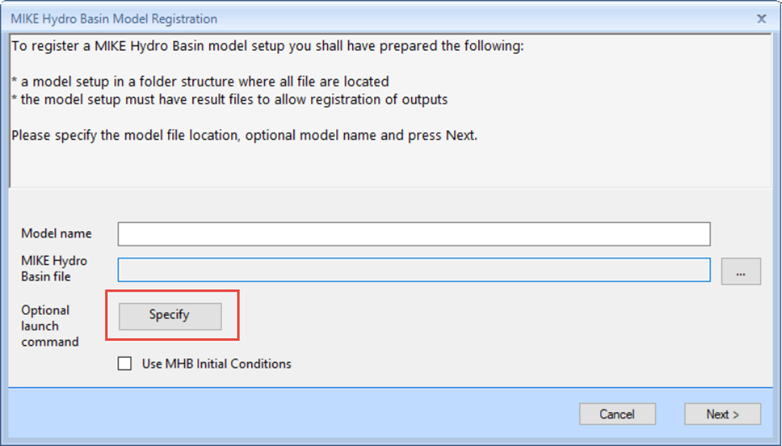
If no launch command is specified, the adapter runs the MIKE Basin
engine if no Rainfall-Runoff model is specified. In case a
Rainfall-Runoff model is specified, it uses the
DHI.MHydro.Application.exe to run the Rainfall-Runoff model and the MIKE HYDRO Basin model.
Hotstart functionality for the Rainfall-Runoff model is supported if the MIKE HYDRO Basin setup is configured accordingly: Use Hotstart files is checked on and Create runoff hotstart files is checked on. The adapter maintains only one hotstart file which implies that only one runoff hotstart file can be specified in the model setup.
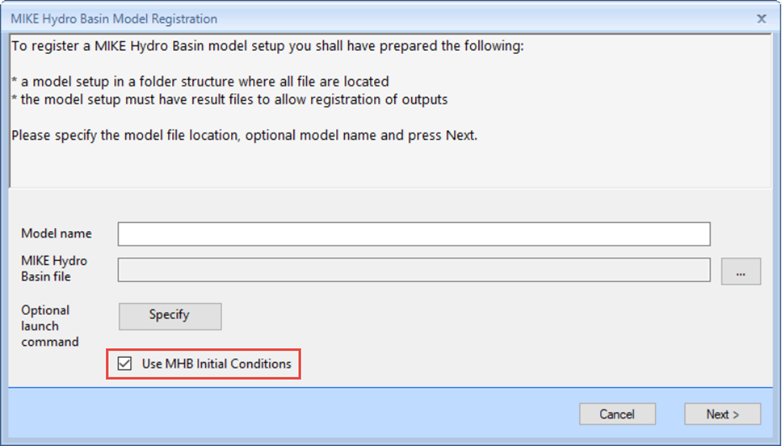
The MIKE HYDRO Basin UI does not allow to run the MIKE Basin engine with support of hotstart functionality for MIKE HYDRO Basin parameters such as initial reservoir levels. However, the adapter does support this functionality offered by the MIKE Basin engine. If Use MHB Initial Conditions is checked at registration, the adapter creates necessary folders and maintains MIKE HYDRO Basin hotstart files in the registered model setup folder.
If the MIKE HYDRO Basin hotstart support is activated, the adapter creates the folder MBHOTSTARTINPUT and MBHOTSTARTOUTPUT in the root folder.
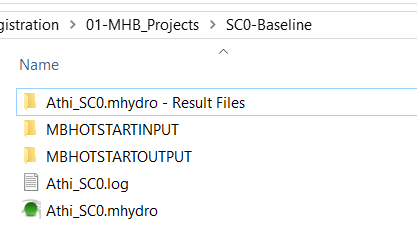
The MIKE Basin engine supports storing of parameters for hotstarting when simulated time step by time step. Consequently, the adapter runs the MIKE Basin engine time step by time step if support for hotstart on MIKE HYDRO Basin parameters is activated. The hotstart files are written to MBHOTSTARTOUTPUT. At simulation run, hotstart files from the corresponding MBHOTSTARTOUTPUT folder are copied to the MBHOTSTARTINPUT folder and the MIKE Basin engine hotstarts on these files. This logic is the same compared to the initial condition support of all other adapters.
If a Rainfall-Runoff model is specified and the option for hotstarting
on MIKE HYDRO Basin parameters is activated, then the adapter runs the
MIKE 1D engine to run the Rainfall-Runoff model and the MIKE Basin
engine to run the MIKE HYDRO Basin model. This model execution is
similar to the DHI.MHydro.Application.exe.