EPANET Adapter
EPANET is a public domain, water distribution system modeling software package developed by the United States Environmental Protection Agency's (EPA) Water Supply and Water Resources Division.
EPANET provides an integrated environment for editing network input data, running hydraulic and water quality simulations, and viewing the results in a variety of formats. EPANET provides a fully equipped and extended period of hydraulic analysis that can handle systems of any size. The package also supports the simulation of spatially and temporally varying water demand, constant or variable speed pumps, and the minor head losses for bends and fittings. The modeling provides information such as flows in pipes, pressures at junctions, propagation of a contaminant, chlorine concentration, water age, and even alternative scenario analysis. This helps to compute pumping energy and cost and then model various types of valves, including shutoffs, check pressure regulating and flow control.
EPANET's water quality modeling functionality allows users to analyze the movement of a reactive or non-reactive tracer material which spreads through the network over time. It tracks the reactive material as it spreads, measuring the percentage of flow from the given nodes. The package employs the global reaction rate coefficient which can be modified on a pipe-by-pipe basis. The storage tanks can be modeled as complete mix, plug flow or two-compartment reactors.
Limitations
- Inp - file must be in the root folder of the setup.
Model objects
The below list of model objects can be derived from a MIKE Epanet setup.
- Curve
- Parameters:
- Name
- Data
- Parameters:
- Junction
- Parameters:
- Name
- Elevation
- Calculate demand
- Zone
- Demand
- Parameters:
- Pattern
- Parameters:
- Name
- Multipliers
- Parameters:
- Pipe
- Parameters:
- Name
- Diameter
- Head node
- Tail node
- Length
- Friction
- Initial status
- Parameters:
- Pump
- Parameters:
- Name
- Head node
- Tail node
- Initial speed
- Initial status
- Curve
- Parameters:
- Reservoir
- Parameters:
- Name
- Head
- Pattern
- Parameters:
- Tank
- Parameters:
- Name
- Elevation
- Diameter
- Initial level
- Minimum level
- Maximum level
- Minimum volume
- Volume curve
- Parameters:
- Valve
- Parameters:
- Name
- Head node
- Tail node
- Diameter
- Type
- Initial status
- Initial setting
- Parameters:
- Zone
- Parameters:
- Name
- Parameters:
Configuration
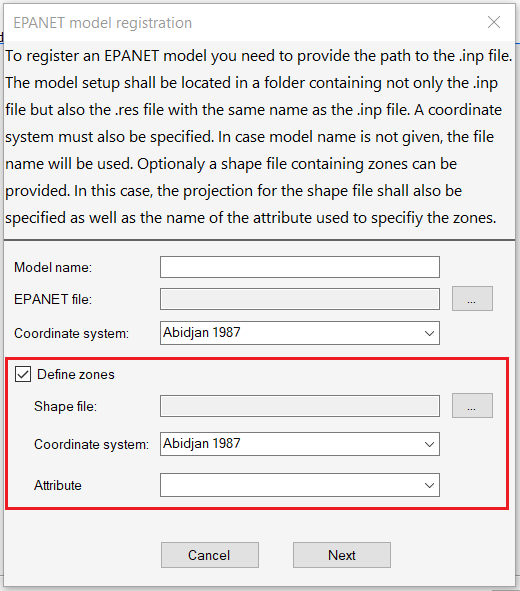
If Define zones is checked at registration, the adapter defines the zones by specifying a shape file containing zones.